inverter Circuit Diagram Maker Team

How to Make a 12V to 220V AC Circuit Diagram

Learn how to draw a 12V to 220V AC inverter circuit diagram step by step. Understand the main components, power flow, transformer stage, and safety rules before building or documenting an inverter schematic.

invertertutorialpower-electronicscircuit-design

Interactive Article Panel

Diagram + table companion

Switch between reading, building, and review views for a quick technical summary of this article.

How to Make a 12V to 220V AC Circuit Diagram

Build flow

How to draw a clean circuit diagram

Place sources first, arrange function blocks left to right, then connect and annotate only after the main topology is stable.

POWER find rails first SIGNAL trace the path LOAD confirm output

Interactive reference table

Updates live
Start with Input power and main ICs
Then place Support parts and passives
Connect using Orthogonal wire routing
Finish with Labels, values, and notes

How to Make a 12V to 220V AC Circuit Diagram

A 12V to 220V AC circuit diagram shows how low-voltage DC from a battery is converted into high-voltage AC for loads such as lamps, fans, chargers, or small backup systems. If you are documenting an inverter project, studying power electronics, or preparing a clean schematic for a report, it is important to understand the logical structure of the circuit before you start drawing.

In this guide, we will walk through the core blocks of a 12V to 220V inverter circuit diagram, explain how the power conversion stage works, and show how to lay the schematic out clearly inside Circuit Diagram Maker.

What Is a 12V to 220V AC Inverter Circuit?

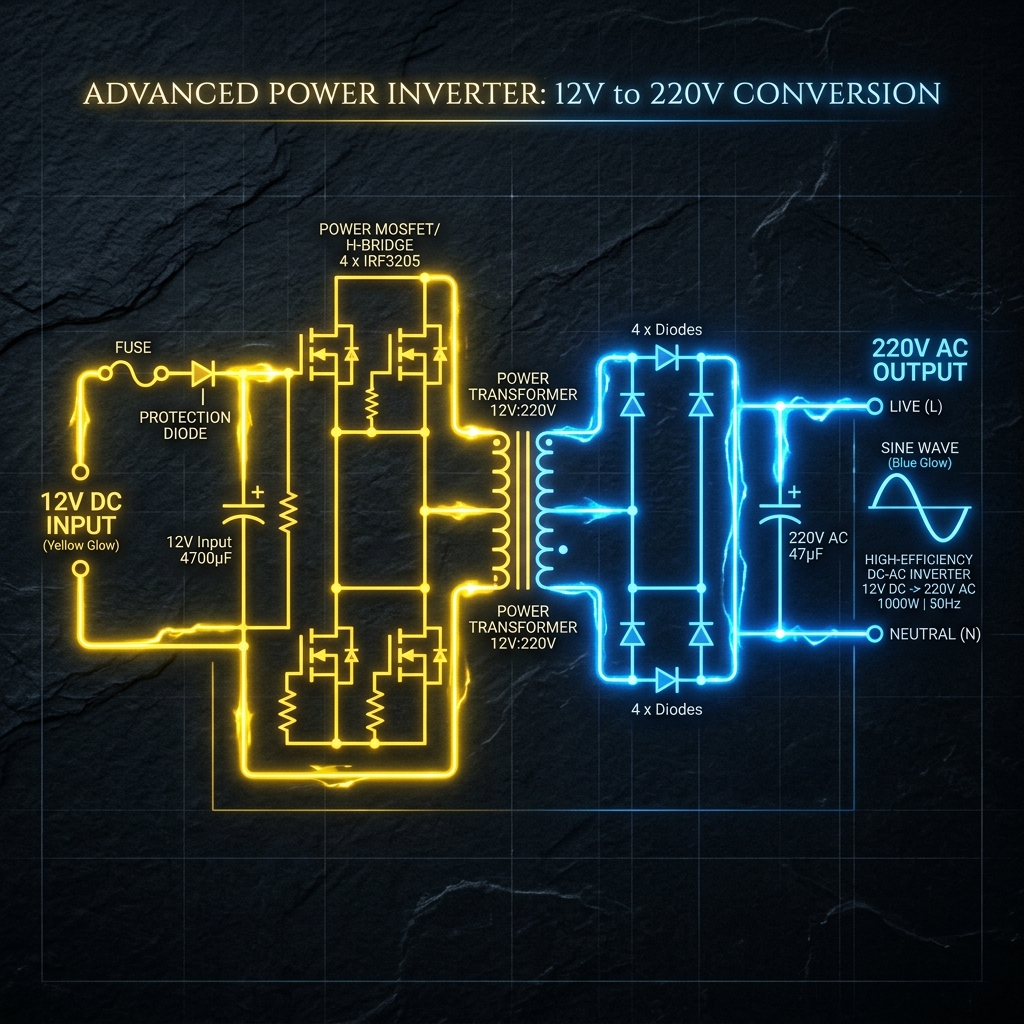
A 12V to 220V AC inverter circuit converts 12V DC input into 220V AC output using a switching stage and a voltage step-up stage. In practical designs, this usually happens in three major steps:

  1. The 12V battery feeds the switching stage.
  2. Transistors or MOSFETs rapidly alternate the current.
  3. A transformer steps the voltage up to a higher AC output.

The exact waveform may be square wave, modified sine wave, or sine wave depending on the design complexity. For a basic educational schematic, the most common version is a transformer-based inverter circuit with MOSFET switching.

Main Blocks of the Circuit Diagram

When drawing a 12V to 220V AC circuit diagram, it helps to break the design into functional sections instead of trying to place every symbol at once.

1. DC Input Section

This is the entry point of the circuit and normally includes:

  • A 12V battery or DC source
  • An input fuse
  • A switch
  • Optional reverse-polarity protection

This section should be placed on the left side of the schematic so the power flow is easy to follow.

2. Oscillator or Driver Section

The oscillator produces the alternating control signal that drives the switching devices. Depending on the design, this block may use:

  • A 555 timer
  • A CD4047 IC
  • A simple transistor multivibrator
  • A microcontroller-based PWM driver

This part is often the “control brain” of the inverter and should sit near the middle-left of the diagram.

3. MOSFET or Transistor Switching Stage

This is the power stage that rapidly switches current through the transformer primary. Typical devices include:

  • IRFZ44N
  • IRF3205
  • TIP41/TIP42 in simple transistor-based designs

In a clean schematic, keep this block separate from the low-power logic area and clearly label the gates, drains, sources, or transistor terminals.

4. Transformer Step-Up Stage

The transformer is the part that raises the voltage from the low-voltage switching side to the high-voltage AC side. In a basic inverter:

  • The primary winding connects to the MOSFET switching side
  • The secondary winding provides the higher AC voltage output

This block should be clearly marked because it separates the low-voltage and high-voltage sides of the circuit.

5. Output and Protection Section

The output side may include:

  • AC output terminals
  • Filter components
  • Fuse or breaker
  • Load connection labels

This part belongs on the right side of the schematic to maintain left-to-right signal and power flow.

Typical Components Used

The exact values depend on the design, but the table below shows a common educational inverter schematic structure:

SectionTypical ComponentRole in the Circuit
Input12V batteryDC source
ProtectionFuse, switchBasic input safety and control
OscillatorCD4047 or 555 timerGenerates alternating drive signal
Power stageMOSFET pairSwitches current through transformer
Step-up stageCenter-tapped transformerConverts low-voltage switching into high-voltage AC
OutputAC terminals, filterFeeds the load

How the 12V to 220V AC Circuit Works

Understanding the operation makes the diagram much easier to draw correctly.

Battery Supplies the DC Input

The battery provides a steady 12V DC input. This feeds both the driver circuit and the switching stage.

Oscillator Creates Alternating Control Pulses

The oscillator produces two alternating output signals. These signals drive the MOSFETs one after the other, rather than both at the same time.

MOSFETs Switch the Transformer Primary

Each MOSFET energizes part of the transformer primary winding. Because the current alternates between both sides, the transformer sees an alternating magnetic field.

Transformer Steps Up the Voltage

The changing magnetic field in the transformer creates a higher AC voltage on the secondary side. That is how the circuit reaches the 220V output region.

Output Is Delivered to the Load

The stepped-up AC output can then be sent to the output terminals. In simple inverter schematics this may be a square-wave style output. In more advanced systems, additional filtering and control stages improve waveform quality.

How to Draw the Circuit Diagram Step by Step

Here is a clean way to draft the inverter schematic in Circuit Diagram Maker.

Step 1: Place the DC Source

Add the battery symbol on the far left. Label it clearly as 12V DC.

Then place:

  • Fuse
  • Power switch
  • Ground reference

This establishes the input block.

Step 2: Add the Oscillator or Driver Block

Place the control IC or timing circuit to the right of the battery block. Label all important pins and outputs. If you are using a CD4047 or 555 timer, add the timing resistor and capacitor near that IC.

Step 3: Add the MOSFET Switching Stage

Place the MOSFETs to the right of the oscillator. Keep the gate-drive lines clean and short in the diagram. Label the transistors clearly so the switching path is easy to inspect.

Step 4: Add the Transformer

Place the transformer after the switching stage. Make sure the primary winding connects to the transistor stage and the secondary winding connects to the AC output side.

This is one of the most important parts of the schematic. If the transformer is drawn unclearly, the whole inverter diagram becomes hard to understand.

Step 5: Add the AC Output Block

On the far right, place:

  • AC output terminals
  • Optional output fuse
  • Load symbol if needed

Label the output as 220V AC so the high-voltage side is unambiguous.

Use this structure when arranging the final schematic:

Diagram AreaWhat to Place There
Left12V source, fuse, switch
Middle-leftOscillator or driver circuit
MiddleMOSFET switching stage
Middle-rightTransformer
Right220V AC output and load

This layout makes the diagram much easier to read during design review or troubleshooting.

Common Mistakes When Drawing an Inverter Circuit Diagram

Even when the circuit idea is correct, the schematic can become confusing if it is not organized properly.

Mixing Control and Power Sections

Do not overlap the low-power oscillator section with the high-current switching section. These should be visually separated.

Drawing the Transformer Ambiguously

Always show the primary and secondary windings clearly. If the transformer is center-tapped, label the center tap explicitly.

Not Labeling the Output Properly

The right side of the circuit should be marked clearly as 220V AC output. This helps distinguish it from the 12V DC side.

Forgetting Protection Elements

For documentation and clarity, include the fuse and switch in the diagram even if you are sketching a simplified version.

Safety Notes

This topic involves potentially dangerous voltage levels. A few important reminders:

  • 220V AC can cause serious injury or death
  • Transformer and MOSFET stages may carry high current
  • Incorrect wiring can damage components quickly
  • A diagram for learning is not the same as a fully production-ready inverter design

If you are preparing a buildable circuit, always verify component ratings, isolation, thermal performance, and protection methods.

Best Practices for a Clean 12V to 220V Inverter Schematic

  • Keep power flow left to right
  • Put low-voltage and high-voltage sections in separate areas
  • Label important nodes such as 12V, GND, Gate Drive, and 220V AC
  • Keep wire crossings to a minimum
  • Use reference labels like Q1, Q2, T1, F1, and U1

Final Thoughts

Drawing a 12V to 220V AC circuit diagram becomes much easier when you think in blocks: input, control, switching, transformer, and output. Once the logical structure is clear, the final schematic is much cleaner and easier to review.

If you want to create a professional inverter schematic visually, open the Circuit Diagram Maker editor and build the diagram section by section. You can also review our documentation, browse the component library, and learn more from related guides such as How to Make a Circuit Diagram Online, Circuit Diagram Symbols Explained, and Best Practices for Circuit Schematic Design.